
We recently released Streaks Strokes, our new indoor rowing app for iPhone and Apple Watch.
One of its main features is the live connection to the Concept2 PM5, the monitor on the front of the Concept2 RowErg. Concept2 documents the PM5's Bluetooth interface well, but making the connection work reliably on real rowers took a lot more care than reading the spec. The PM5 is a small, battery-powered unit that does a lot during a row, and real monitors don't always behave the way the documentation says.
In this article we want to cover how the PM5 works over Bluetooth, and the problems we ran into. It's written for developers. If you just want to connect your PM5 to your iPhone, see How to connect a Concept2 PM5 to your iPhone and Apple Health instead.
In Short
- The PM5 uses Bluetooth Low Energy, with four Concept2 services: device information, control, rowing data and heart rate.
- Rowing data arrives as notifications, some on a timer (every 500ms by default) and some when something happens, like the end of a stroke or a split.
- Workouts are sent to the PM5 as CSAFE frames, split into Bluetooth writes of up to 20 bytes.
- Real monitors don't always match the spec, and older firmware can freeze while sending force curve data.
- Apple Watch heart rate reaches the PM5 by way of the iPhone, which writes it to the PM5's heart rate input.
The PM5's Bluetooth Services
As well as the standard ones every Bluetooth device has, the PM5 has four Bluetooth Low Energy services of its own. Concept2 documents all of them in its PM CSAFE Communication Definition, which you can download from its Software Development page.
Every Concept2 service and characteristic shares the same base UUID, CE06xxxx-43E5-11E4-916C-0800200C9A66, with a 16-bit ID in place of xxxx:
| Service | ID | What we use it for |
|---|---|---|
| Device information | 0x0010 |
Serial number and firmware version (0x0014) |
| Control | 0x0020 |
Sending workouts (we write to 0x0021) |
| Rowing | 0x0030 |
Everything you see during a row, and the sample rate (0x0034) |
| Heart rate | 0x0040 |
Sending heart rate to the monitor (0x0041) |
We subscribe to up to 13 characteristics in the rowing service. The main ones are:
- General Status (
0x0031): elapsed time, distance, and the state of the workout and the rower. - Additional Status (
0x0032,0x0033,0x003E): speed, stroke rate, heart rate, pace, power, the machine type and the monitor's own state. - Stroke Data (
0x0035,0x0036): drive length, drive time, force and power for each stroke. - Split Data (
0x0037,0x0038): sent at the end of each split. - Force Curve (
0x003D): the shape of each stroke, sent across several notifications.
Values are little-endian, many are 24-bit, and most have their own units. Even force has its own unit, as it's sent in tenths of a pound. For example, General Status is 19 bytes:
| Bytes | Value |
|---|---|
| 0–2 | Elapsed time (hundredths of a second) |
| 3–5 | Distance (tenths of a metre) |
| 6 | Workout type |
| 7 | Interval type |
| 8 | Workout state |
| 9 | Rowing state |
| 10 | Stroke state |
| 11–13 | Total work distance |
| 14–16 | Workout duration |
| 17 | Workout duration type |
| 18 | Drag factor |
The force curve is the most involved. A single curve is anywhere from 2 to 288 bytes, split across several notifications. The first byte of each one says how many notifications make up the curve and how many points are in this one, the second is a sequence number, and the rest are 16-bit points. If any piece of a curve goes missing, we drop the whole curve rather than draw half of it.
We store every value exactly as the PM5 sends it, and only convert it when it's displayed. This makes it easy to compare what we received against the spec, and against recordings of real rows (more on these below).
How Often The PM5 Sends Data
The PM5 sends data in two ways. The status characteristics (0x0031, 0x0032, 0x0033 and 0x003E) are sent on a timer. Everything else is sent when something happens. The spec doesn't say when, but this is what we see in our recordings, and it matches OpenRowingMonitor's notes:
- At the end of each drive: stroke data (
0x0035,0x0036) and the force curve (0x003D). - At the end of each recovery: stroke data (
0x0035) again. - At the end of each split: split data (
0x0037,0x0038,0x0042). - At the end of the workout: the workout summary (
0x0039,0x003A) and the logged workout (0x003F).
The timer is set by writing to 0x0034: 0 for every second, 1 for 500ms (the default), 2 for 250ms and 3 for 100ms.
At 500ms, the timing of each stroke was too coarse for the live workout screen to show the drive properly. Our PM5 simulator (more on this below) sends data every 100ms, so this only showed up on a real rower. We first asked for 100ms, but on a real rower the link couldn't keep up. It delivered 7.5 updates a second instead of 10, each one arriving later than the last. At 250ms it held exactly 4 updates a second with almost no delay, and it used less of the phone's CPU, so that's what Streaks Strokes asks for now.
Using some back-of-the-napkin maths, here's roughly what the four status characteristics send (not including stroke data, splits and the force curve):
| Update rate | Per second | 30 minute row |
|---|---|---|
| 500ms (default) | 8 notifications, about 150 bytes | about 14,400 notifications, 270 KB |
| 250ms (what we use) | 16 notifications, about 300 bytes | about 28,800 notifications, 540 KB |
We also read 0x0034 back after connecting, and again if updates slow down, to check the setting held, and write it again if it didn't. In practice, the bigger problems were the Bluetooth link delivering fewer updates than the monitor sent, and one monitor slowing down to an update about every 370ms after the first 20 seconds.
To tell these apart, we compare the time each update arrives on the phone against the elapsed time inside it, which comes from the rower's own clock. If the rower's clock moved 0.25 seconds between updates but they arrived further apart, the delay is in the link. If the rower's clock jumped further, the monitor sent fewer updates.
Recording A Row
Because the data is so small, it's easy to record. A diagnostic recording is a small binary file with a header and one entry per notification: when it arrived, which characteristic it came from, whether we sent it or received it, and the raw bytes.
These recordings settled several of the bugs below. In one, the app showed an 8.3 second "silence", but the rower's own clock had only moved 0.11 seconds over the same time. The rower had paused itself, and the link was fine.
We also keep real recordings in our tests. This matters because tests that only encode and decode our own data can only prove that our encoder agrees with our decoder, even if both have misread the spec.
Sending Workouts To The PM5
An app can program a workout on the PM5, so the monitor runs it too. For example, if you choose to row 2000m in Streaks Strokes, the PM5 counts down from 2000m.
Workouts are sent using CSAFE, a fitness equipment protocol that's older than Bluetooth. Each frame starts with F1, ends with F2, and has a checksum before the end, which is every byte in between combined with XOR. If any byte from F0 to F3 appears inside a frame, it's escaped as F3 followed by its last two bits.
// The checksum is every byte of the frame's contents XORed together.
// The PM5 rejects a frame whose checksum doesn't match.
static func checksum(_ contents: [UInt8]) -> UInt8 {
    contents.reduce(0, ^)
}

// F0 to F3 are reserved (F1 starts a frame and F2 ends it), so a byte
// in that range inside a frame is sent as F3 plus its last two bits.
// For example, F2 becomes F3 02.
static func stuff(_ bytes: [UInt8]) -> [UInt8] {
    var out: [UInt8] = []
    for b in bytes {
        if b >= 0xF0 && b <= 0xF3 {
            out.append(0xF3); out.append(b & 0x03)
        } else {
            out.append(b)
        }
    }
    return out
}

// A frame is the start byte, then the stuffed contents and checksum,
// then the end byte.
static func wrap(contents: [UInt8]) -> Data {
    let withChecksum = contents + [checksum(contents)]
    return Data([0xF1] + stuff(withChecksum) + [0xF2])
}
The PM5-specific commands all go inside one Concept2 wrapper command (0x76), followed by its length. For a 2000m row with 500m splits, the app sends:
F1 76 18
   01 01 03                 set the workout type
   03 05 80 00 00 07 D0     set the duration: 0x80 means distance, 0x07D0 is 2000
   05 05 80 00 00 01 F4     set the split: 0x01F4 is 500
   14 01 01                 configure the workout
   13 02 01 01              show "prepare to row"
   4C F2
The distances are big-endian, even though the rowing data the PM5 sends back (0x0031 onwards) is little-endian.
The PM5's control characteristic (0x0021) takes writes of up to 20 bytes, so this 29-byte frame goes out as two writes.
One error sent us the wrong way for a while. The PM5 sometimes showed ERG FAULT 396, which the spec calls a frame overrun. That sounded like the two writes arriving too close together, so we started writing each one with a response, so the PM5 confirms it before the next one goes out. But that wasn't the cause, as the error also appeared after frames small enough to go in a single write. The problem was what we sent and when: a new workout sent to a PM5 that already had one, an end-workout command sent when there was nothing to end, or the app resending a workout just as the PM5 accepted the first one.
INVALID WORKOUT TYPE
Our first attempts showed INVALID WORKOUT TYPE on the PM5. It turned out there were three separate problems, and any one of them causes the same error:
- A missing step: we never sent the "configure the workout" command (
14 01 01). - The wrong format: each command went out in its own frame, rather than all of them inside one
0x76command. - The wrong time: the workout was sent when rowing started, in the middle of a stroke, rather than while the PM5 was waiting.
We had to fix all three before the PM5 accepted a workout, which made it very confusing to track down.
Timing
Even with the frame right, the timing matters. A workout sent 20ms after connecting was ignored, and the PM5 stayed on its menu. Now the app waits until the PM5 reports its state (on 0x003E), sends the workout, then watches the next few reports to confirm the PM5 took it, and sends it once more if not.
A few more things we learned:
- There's no "start" command. Once a workout is set, the PM5 waits, then starts by itself on the first stroke.
- Very short workouts are an error. Anything under 20 seconds or 100m shows error 64 on the PM5, so the app sends these as Just Row instead.
- We only program simple workouts (Just Row, a fixed time or a fixed distance). For intervals and target workouts (such as staying in a heart rate zone), the PM5 runs as Just Row and the app keeps track of the intervals. If we programmed the PM5 for these, it would end the workout at the wrong time.
- Never program a rower mid-row. One early bug meant that tapping a workout could reprogram the PM5 while someone was 1200m into a 5000m row! With the handle resting mid-row, the PM5 reports its rowing state as inactive, but its workout state is still rowing. We were only checking the first one.
Testing Without A Rower
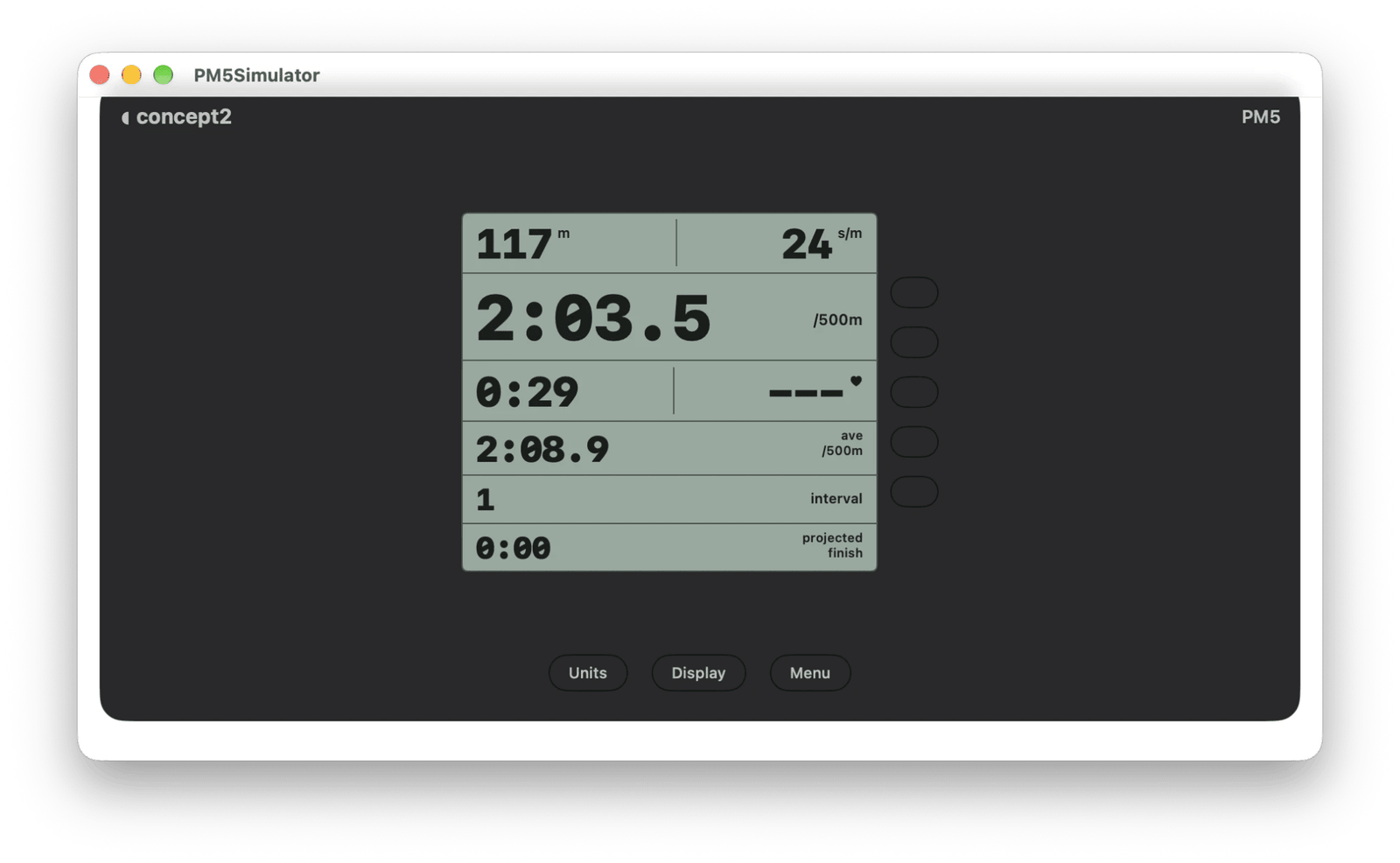
Before we had a rower to test with, we built a Mac app that pretends to be a PM5. It draws a PM5 screen and advertises over Bluetooth as "PM5 430000000", and the iPhone app connects to it the same way it connects to a real rower. It uses CBPeripheralManager, with the same table of services and characteristics as the app.
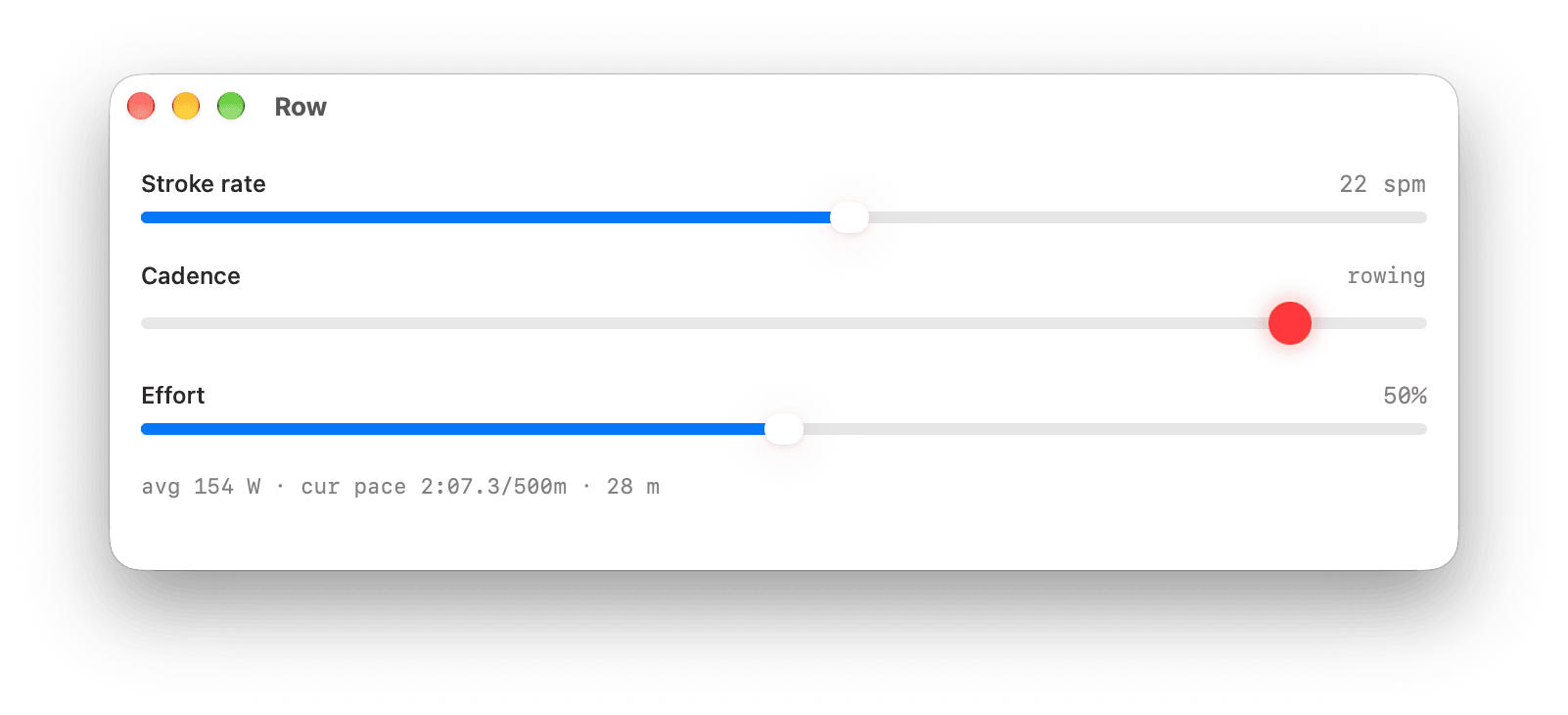
A second window has sliders for stroke rate and effort, so we can test any pace or stroke rate without actually rowing.
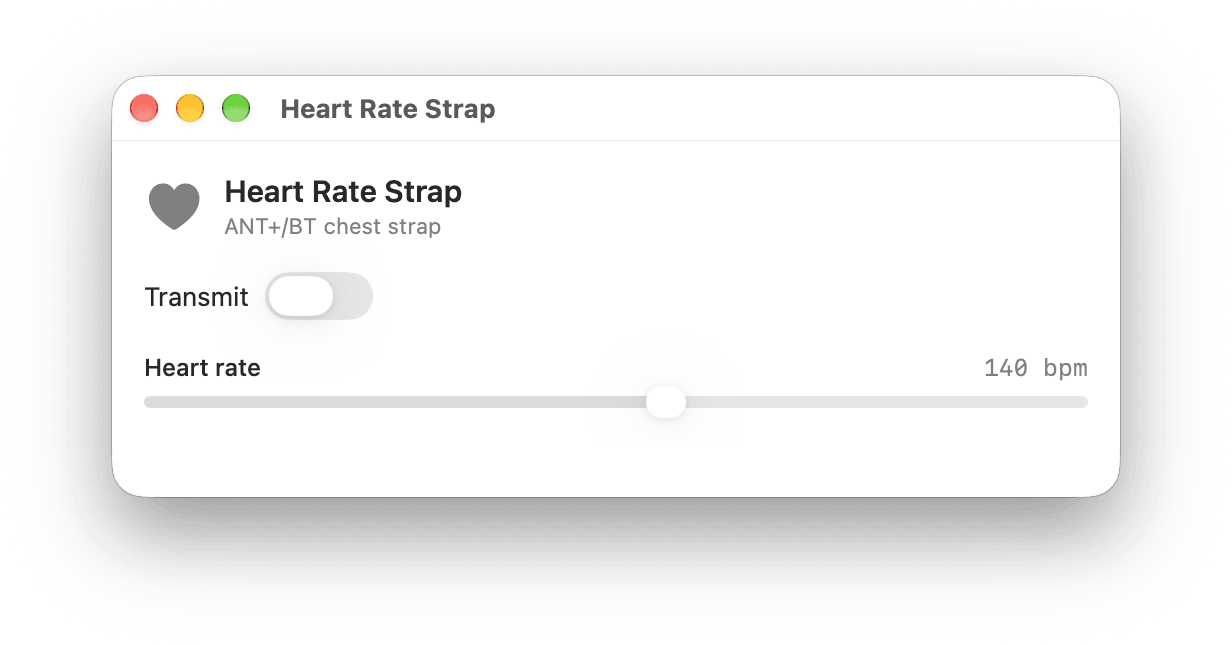
The simulator also has a pretend chest strap, which feeds heart rate into the simulated PM5 the way a real strap would, so we could test how the app handles strap heart rate without wearing one.
This made development much faster, and we still use it alongside real hardware.
The limitation of a simulator is that it shares its assumptions with the app. Both are built from the same table, so if the table is wrong, the app and the simulator are wrong in the same way and still work together.
This happened with heart rate. We had put the heart rate characteristic (0x0041) in the rowing service, when the PM5 actually has a separate heart rate service. Against the simulator everything worked and the tests passed, but on a real PM5 the heart rate from Apple Watch never reached the monitor, and there was no error to point to it.
We now check the table directly against the spec, and test against data recorded from real PM5s as well as the simulator.
Where Real Monitors Differ From The Spec
Concept2's documentation is detailed and very helpful, but real PM5s don't always match it.
- Split time units: the spec says the last split time in
0x0033is in tenths of a second, but real PM5s send hundredths, so following the spec would make every split ten times too long. - A shorter characteristic: the spec says Additional Stroke Data (
0x0036) is 18 bytes in one table and 17 in another, but a real PM5 sends 15, which is what the older 2022 version of the spec said. Our first decoder required 18, so it threw away every one of them, which meant no live power on a real rower. - Battery level:
0x003Eis 19 bytes in one table and 18 in another. The battery level was added in a later version of the spec, so on an 18-byte frame we report the battery as unknown, not empty.
There's also a mistake in one of the spec's worked examples. The Terminate command is shown as F1 76 04 13 02 01 02 62 F2, but the checksum of 76 04 13 02 01 02 is 0x60, not 0x62.
The OpenRowingMonitor project was a big help here. Its notes on how a real PM5 behaves helped us confirm several of these.
Because of this, the decoders for these characteristics now use what's there when a frame is shorter than expected, rather than throwing the whole frame away:
init?(from data: Data) {
    // Accept the 15 bytes a real PM5 sends, not just the spec's 18
    guard data.count >= AdditionalStrokeData.minimumByteCount else {
        return nil
    }

    var r = ByteReader(data)

    guard let elapsedTime = r.readUInt24(),
          let strokePower = r.readUInt16(),
          let strokeCalories = r.readUInt16(),
          let strokeCount = r.readUInt16(),
          let projectedTime = r.readUInt24(),
          let projectedDistance = r.readUInt24()
    else {
        return nil
    }

    // Real PM5s leave off the last field, so default it to zero
    let projectedOther = data.count >= AdditionalStrokeData.byteCount
        ? (r.readUInt24() ?? 0)
        : 0

    ...
}
Why The PM5 Froze Mid-Row
On one rower, the PM5 would freeze in the middle of a row. It stopped sending data and also stopped its own workout clock. In one 66 second test, it lost 36.8 seconds to three freezes. With no app connected, the same rower worked perfectly.
We spent a long time trying different theories, including too much Bluetooth traffic, a problem with how we built commands, and even a faulty flywheel sensor. Looking back over our recordings, every freeze came about two seconds after a force curve notification.
The answer was in Concept2's firmware release notes:
Resolved issues with PM5 freeze up during transmission of force curve data
That rower was running firmware 459.037, and we were subscribing to the force curve.
The firmware version is in 0x0014, as a string like 8200-000468-459.037. The last part is the version, but the number before the dot depends on the PM5's hardware. The fix shipped in May 2026 as 178.067, 217.067, 262.067 and 459.067, so the part that matters is the number after the dot.
The app now reads the firmware before subscribing to the force curve. If the firmware is older, or we can't read it, we don't subscribe:
static func supports(_ capability: PM5FirmwareCapability, firmware raw: String?) -> Bool {
    // No firmware rule for this feature, so any PM5 can do it
    guard let rule = rules.first(where: { $0.capability == capability }) else { return true }
    // Firmware we can't read counts as too old
    guard let raw, let version = PM5FirmwareVersion(parsing: raw) else { return false }
    // Compare the number after the dot (067 for the May 2026 release)
    return version.minor >= rule.minimumMinor
}
Getting this wrong one way means a frozen rower, and the other way means one missing chart, so an unknown version is treated as too old. On older firmware you won't see the force curve chart, but your workout won't freeze.
Staying Connected To The PM5
Unfortunately, staying connected to the PM5 was much harder than reading its data.
Firstly, we originally treated the PM5 as connected once all 13 subscriptions were confirmed. If one confirmation never arrived, the app showed "not connected" while data was arriving several times a second. Now, if data is arriving, the app treats it as connected.
Next, Core Bluetooth handles reads, subscriptions and writes that need a response one at a time, in order. On a link taking 2 to 4.5 seconds per request, the read we needed most was tenth in line and arrived 18.6 seconds after connecting. Now the app asks for things in this order:
- The monitor's state (
0x003E), then General Status (0x0031). - The sample rate.
- The rest of the status and stroke data, and the workout summary.
- Splits, heart rate strap info and the logbook, once the workout has been sent.
The device information reads also wait until the workout has been sent. The PM5 answers them about a second apart, and a workout sent during that time sat on the PM5 for 5.3 seconds before it did anything.
The PM5 also doesn't go to sleep while a phone is connected. In one test, an idle PM5 stayed on for more than ten minutes showing "App Connected". This means a phone left anywhere in the house could keep the monitor on all day and run down its batteries. The app now stays connected while it's open or while you're rowing, and disconnects two minutes after you leave it. We first disconnected straight away, but finishing a row, glancing at another app and coming back meant the rower was gone.
Finally, after the app disconnects, the PM5 often doesn't notice. While it thinks it's still connected it doesn't advertise, so scanning for it finds nothing. To reconnect, the app asks Core Bluetooth for the rower it already knows (retrievePeripherals(withIdentifiers:)) and connects to it directly, while it keeps scanning.
One more tip: when an app is in the background, iOS doesn't deliver anything to a scan that isn't filtered by service, so always scan for the PM5's rowing service.
Choosing The Right Rower In A Gym
Every PM5 advertises a name like "PM5 430123456", which includes its serial number. This means the app can tell rowers apart before connecting, and it remembers the serial numbers of the rowers you use. (One PM5 we saw advertised without a serial number, so the app falls back to Core Bluetooth's identifier, and swaps in the serial number once connected.)
The app connects by itself to a rower it already knows, and asks you to choose when it's not sure:
- A rower it has never seen always needs you to confirm it, even if it's the only one nearby.
- If an unknown rower has a much stronger signal (more than 12 dB) than your own rower, you're probably sitting at a different one, so it asks.
- If two of your known rowers are side by side, it asks which one.
Signal strength never makes the app connect to a rower you haven't confirmed. It only decides whether to ask, or which of your own rowers is clearly closest.
Once it's connected, it also checks the PM5 is waiting for a workout to start (the workout state in General Status). Otherwise, we'd end up recording someone else's workout into your streak.
Concept2's SkiErg and BikeErg also use the PM5, with the same Bluetooth services as the RowErg. The machine type is in Additional Status (0x0032), so the app disconnects from anything that isn't a RowErg.
One last surprise: a PM5 in a gym wouldn't accept a connection until the rower was selected on the monitor's own menu. From the phone, this looks exactly the same as the rower being out of range.
Showing Apple Watch Heart Rate On The PM5
In Streaks Strokes, the Apple Watch doesn’t connect to the PM5. Only the iPhone does.
The Watch runs its own workout and sends your heart rate to the iPhone, which writes it to the PM5's heart rate input (0x0041). This is the same input a chest strap uses, so the PM5 shows your Apple Watch heart rate on its own screen. It's a 20-byte value that's almost entirely zeroes:
var encoded: Data {
    // 20 bytes, all zero apart from the ones set below
    var d = Data(count: 20)
    d[0] = 0                                  // Type: Bluetooth
    d[5] = UInt8(heartRate & 0xFF)            // Heart rate, low byte
    d[6] = UInt8((heartRate >> 8) & 0xFF)     // Heart rate, high byte
    return d
}
Unfortunately, getting heart rate from the Watch to the iPhone was harder. During a workout with the screen dimmed, the Watch app isn't the frontmost app, so WCSession reported the iPhone as reachable for only 7.4 seconds of a 50 second row. Sending messages that way lost most readings (5 of 7 heart rates in that row).
Now the Watch sends each reading three ways: through the workout mirrored to the iPhone with HealthKit, through updateApplicationContext, and through sendMessage. Every reading has a timestamp, so the iPhone only uses a reading that's newer than the last one, and ignores anything more than a minute old. We decided against transferUserInfo, as it delivers in order, so after a gap the last reading to arrive would be the oldest.
The PM5 also includes the heart rate it's displaying in its rowing data, so as soon as the phone sends one, it comes straight back. At one point the app thought this echo was coming from a chest strap. In a test that reproduced it, it counted 12 seconds "in zone" from a value that wasn't changing. Now a heart rate only counts as a chest strap if it appears before the phone has ever sent one.
If you already have a chest strap paired with the PM5, the app doesn't send heart rate from the Watch. And if the Watch stops sending heart rate for 15 seconds, the app stops writing to the PM5 rather than sending zero, which is what a strap does when it goes out of range.
Uploading To The Concept2 Logbook
Since version 1.0.3, Streaks Strokes also sends your rows to the Concept2 Logbook, with their splits, heart rate and stroke data.
More Information
- Introducing Streaks Strokes
- Download Streaks Strokes on the App Store
- How to connect a Concept2 PM5 to your iPhone and Apple Health
- Concept2 PM CSAFE Communication Definition
Concept2, RowErg, SkiErg, BikeErg and PM5 are trademarks of Concept2, Inc. Streaks Strokes is not affiliated with or endorsed by Concept2.